The Signal Bot has been fully rebuilt with a smarter engine. Now supports three types of browsers: Chrome, Default (Edge), and WebView. If you have compatibility issues, you can also download the Browser Expansion Pack for additional browser support. Read what changed before you set up:
More Unique Signals — The new app reads a wider range of signal types, giving you more trading opportunities than the previous version.
Three Browser Types Supported — Choose between Chrome, Default (Edge), or WebView mode for maximum compatibility. No Chrome install is required for Edge or WebView modes.
Built-In Browser Detection — The app detects your browser type on startup automatically — no extra configuration required.
Expansion Pack Still Available — If the new app is not compatible with your specific system, the original expansion pack remains available as a fallback option.
Signal Bot v2.0.31 compatibility note
The updated version 2.0.31 was successfully tested on Windows 11 Sandbox, a Hyper-V virtual machine running Windows 10 22H2, and a standard Windows 11 installation.
Telegram Signal Bot
Uses your real Telegram channels. Trades in minutes.
This pricing page is separate from the Pocket Option and Quotex QBot pages. Signal Bot follows the canonical 10-plan license model, with one persistent key per user and channel limits enforced by plan.
No unlimited wording here. Highest tier supports up to 20 channels, matching the license system exactly.
Free trial1 day, 1 channel, one-time only
Weekly tiers2, 5, or 20 channels
Monthly tiers2, 5, or 20 channels
Daily passesOptional short-term access
Same key keptRenewals extend the same license
Watch Before Setup (Telethon)
New users should watch this short Telethon walkthrough before activating Signal Bot. It explains the required Telegram app access flow so setup is clear before starting your trial or paid plan.
Watch this step-by-step video to see exactly how to set up your Telegram API credentials and connect Signal Bot using Telethon. This covers the full process from my.telegram.org to first login and channel connection.
Pricing
Customer-facing prices aligned to the final Signal Bot key system.
Free Trial
1 Day Trial
Free / one-time
Includes 1 Telegram channel
One-time trial per user/device
No renewal, reset, or extension
TRIAL_1D_C1
New Signal Bot users receive a one-time 1-day trial key (TRIAL_1D_C1) during Signal Bot signup onboarding.
Trial is one-time only and limited to 1 day and 1 channel.
Plans are prepaid and expire automatically at end of term.
Channel limits are enforced by key type.
Highest tier supports up to 20 channels.
Renewal extends access based on selected plan.
One persistent key per user is kept across renewals and upgrades.
Short Sales Copy
5-minute setup. No complicated install.
Start with a free 1-day trial (1 channel) and see if it fits your workflow.
Weekly:
$15 = up to 2 channels
$20 = up to 5 channels
$30 = up to 20 channels
Monthly:
$39 = up to 2 channels
$59 = up to 5 channels
$79 = up to 20 channels
Optional remote setup help available: $20 one-time.
Simple, fast, and ready in minutes.
Signal Bot Proof Records
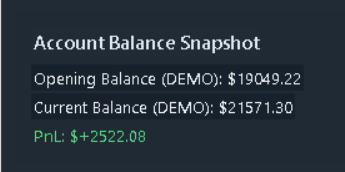
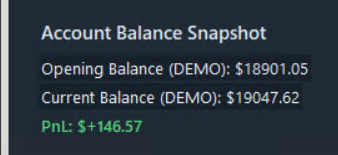
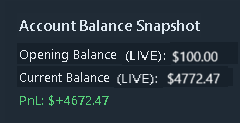
Records showing TEST account demos, LIVE account activity, and a PO withdraw screenshot.
TEST Account
Demo Record 1
TEST Account
Demo Record 2
LIVE Account
Live Signal Bot Record
Withdraw Record
PO Balance Withdraw
Results Context: To achieve these results, 14 Telegram channels were used. These screenshots were not produced with only 1 or 2 channels. While strong outcomes can still be achieved using 1 to 2 channels, the records shown here were generated over a 24 to 36 hour period using 14 channels.
Signal Bot Access Note
Signal Bot signup now issues a one-time 1-day trial key (TRIAL_1D_C1). Continued use requires purchasing an extended plan key (1-day paid, 7-day, or 30-day tiers).